

I test mobile casino apps with one aim: can a Hungarian player install the kaszinó wazamba app Casino app, find jackpot games easily, and gamble securely? This page covers what the app does, which devices usually work, how to install it properly, and what to double-check before you fund your account. I keep to practical advice and won’t promise anything that the official app page has not confirmed. When conditions or offers alter, I’ll direct you to the app or your account to check the latest details.
Which Wazamba Casino App Offers Hungarian Players
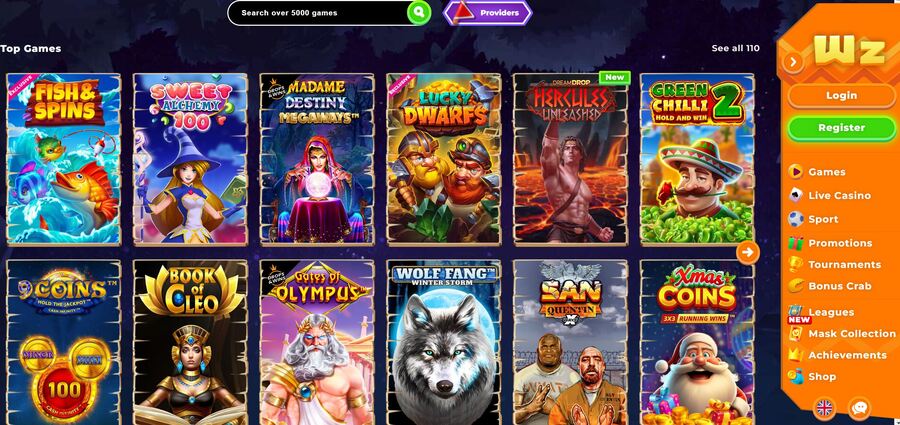
The Wazamba Casino app offers you mobile connection to the operator’s casino lobby. I’m looking at the app experience here, not the desktop site. For Hungarian players, the big appeal is convenience: you can access the lobby, browse game categories, and review jackpot titles directly from your phone or tablet. Consider the app as a front end to your existing account, not a separate wallet. Your balance, verification status, and responsible-gambling settings should carry over once you log in. Before you install, make sure Wazamba welcomes players from Hungary and that the games you see are indeed available in your region.
Jackpot games typically are located in their own category or filter, but the lineup changes as providers add and pull titles. I look for clear info: stake limits, volatility, and any jackpot contribution rules the provider publishes. The app must also let you navigate to search, favourites, cashier, and support quickly. Those are the tools you’ll actually employ during a session. If a jackpot title doesn’t show up, I wouldn’t presume it’s gone for good. Availability can change based on your account, region, or how the lobby is arranged at that moment.
Jackpot Games and In-App Features I Prioritize
When I open the app, I head straight to the jackpot section and test how simple it is to sort, search, and reopen a game. A well-designed mobile interface displays the stake before I spin, maintains my balance visible, and makes it clear whether a jackpot is static, incremental, or connected to a provider network. I also verify if game rules, paytables, and contribution details are available without exiting the session. If a title grabs my attention but the rules are hidden, I consider that a warning to slow down instead of playing hastily.
Beyond jackpots, I check for tools that support my limits: deposit limits, loss limits, session reminders, timeout options, and a detailed transaction history. Notifications can be useful for account updates, but I disable promotional pushes if they are bothersome. I also test the cashier flow without making a deposit, check that Hungarian payment methods appear, and confirm support is easy to reach. These details matter more than eye-catching animations because they decide whether the app is actually usable for daily gaming. I’d rather have a plain, dependable layout than a distracting one.
Device Compatibility and Technical Requirements
I won’t state a set minimum OS version for the Wazamba app because demands change with each update. Instead, I consult the official app page or store listing to see the latest Android and iOS minimums before I download. In practice, a modern phone or tablet with a recent OS, enough free space for the app and updates, and a stable internet connection is the sensible starting point. Older devices might still load the mobile site, but they often face challenges with animations, live dealer streams, or big jackpot lobbies.
Android and iOS at a Glance
For Android, I anticipate the app to come through an official channel linked from Wazamba, maybe a store listing or a direct download, depending on your market. On iOS, the official App Store is the standard route when the app is available there. If it’s not, I rely on the mobile browser instead of grabbing a third-party build. The source is everything: I only install using Wazamba’s own instructions. A compatible device means nothing if the file comes from an unofficial APK site or a mirror with unclear ownership.
What to Review Before Installing
Before installing, I review four things: available storage, OS version, browser or store account region, and whether the app requests permissions that actually make sense. A casino app might need network access and notifications (if you turn them on), but it shouldn’t ask for unrelated access to your contacts or files. I also confirm that I can log in with my existing account and that Hungarian language, currency, and payment options show up where they should. If anything seems off, I halt and contact official support before depositing. That extra minute saves me from avoidable headaches.

Guide to Setting Up the Wazamba Casino App
Here’s my installation rule: always begin with the official Wazamba app page or a store link that Wazamba offers directly. I never use APK mirrors from search results, social media links, or files shared by other players. On the official page, I check the device guidance, select the Android or iOS route shown, and follow the prompts. If the page provides a direct Android download, I confirm that the file type and publisher details align with the instructions before I open it. After installing, I access and review my account settings before I even look at the cashier.
Complete Installation
I start by opening the official app page on the device I’ll use and confirm the download option matches that device. Then I allow the store or browser finish the download and allow the installer to complete. Once the app opens, I approve only the permissions I’m comfortable with and sign in using my existing credentials. After that, I verify that the lobby loads, my balance bleacherreport.com appears accurate, and support is reachable if I need it. If the app doesn’t work at any point, I erase the partial file and try again from the official source instead of trying alternatives.
When You Must Sideload on Android
If Wazamba offers a direct Android download, you might need to sideload. I enable ‘install unknown apps’ only for the specific browser or file manager I’m using, install the file, and then disable that permission right away. I avoid turning on it globally or leave it on after installation. I also verify that the download page is the official one and that my device only alerts me in the expected way. If the installer requests device administrator rights or unrelated permissions, that’s a red flag and I halt right away. That one habit protects my device safe.
Application vs Desktop Site: What’s different on Mobile
The biggest difference is arrangement, not access to your account. On mobile, I look for a condensed lobby, more prominent tap targets, and less visible categories at once, so searching and bookmarks become more important. The desktop site might present more game tiles and comprehensive filters at a glance, but the app makes up for it with a more streamlined interface and faster access to the games you actually play. I’ve observed that the mobile version often displays jackpot lobbies somewhat differently, so I always check the same title on both platforms if I spot a discrepancy in jackpot amounts or bet limits. That practice helps me prevent misunderstandings about what a game should appear as.
Another distinction is how touch controls impact jackpot gameplay. On a phone, I touch to spin, and the screen layout is optimized for one-handed use, which can make sessions feel more direct. But I lack the hover previews that desktop sometimes gives for game rules. I recommend trying a few free-play rounds on mobile before dedicating real money to a jackpot title, because the sensation of a game can alter when you transition from mouse to finger. The app should also remember your preferred view, stake, and sound settings across sessions, which reduces setup time each visit.
Speed, Data Usage, and Regular Mobile Play
Performance differs by game type. Browsing the lobby and playing slots typically use modest data, while live dealer tables and high-res jackpot streams eat more. I start on Wi-Fi, monitor for buffering, and move to mobile data only if my plan can manage it. Battery drain follows the same pattern: animations, video, and long sessions consume more. I close background apps, maintain the device cool, and prevent playing while charging if the phone gets hot. A stable connection counts more than raw speed for avoiding interrupted rounds. I also maintain the app updated so performance fixes land quickly.
I also handle storage and updates carefully. App updates could be large, so I hold enough free space for the download and installation instead of filling the phone completely. I clean the cache only when I see a loading problem, because clearing data might register me out or restore my preferences. If the app feels slow, I compare it with the mobile browser version to determine if the issue is the device, the connection, or the app itself. That quick test saves time before I reach support. I record the time and the screen where it happened so support can reproduce the problem.
FAQ
Is the Wazamba Casino app accessible to Hungarian players?
Indeed, Hungarian players can usually access the Wazamba Casino app, but I always confirm by visiting the official Wazamba website and checking the terms or the app download page. Availability can vary based on your exact location and the current regulatory situation. If the app isn’t listed in your local store, the mobile browser version is a dependable alternative that mirrors most of the app’s functionality without requiring installation.
Are jackpot games available on the Wazamba app?
Absolutely. The app includes a dedicated jackpot section where you can locate both fixed and progressive titles. I recommend using the in-app search or filter to identify your preferred jackpot games quickly. Keep in mind that the selection may differ based on your account region and which providers are active at the time. If a specific title is missing, it could show up again after a lobby update or when you switch to the mobile site.
How can I safely install the app on Android?
I only get the Android app from the official Wazamba page, not ever from third-party APK sites. If a direct download is offered, I enable ‘install unknown apps’ temporarily for the browser I employed, finish the installation, and then disable that permission right away. I also check that the file details match what Wazamba describes. This approach maintains my device secure and guarantees I get genuine updates directly from the operator.
What do I need to verify before making a deposit in the app?
Prior to depositing, I verify that my account is fully verified, that Hungarian forint is available when I need it, and that the payment methods listed contain options I recognize and trust. I also review the deposit limits I established and try the cashier flow up to the final confirmation step without finalizing it. This quick check helps me steer clear of currency conversion surprises and guarantees the transaction process functions properly on my device.
Does the app use more data than the mobile site?
Not always. The app may cache some assets, which can cut data usage during frequent use, but live dealer games and high-definition jackpot streams will eat more data regardless of the platform. I always start on Wi‑Fi to monitor usage, then transition to mobile data only if my plan allows it. Monitoring your data consumption during the first few sessions gives you a solid understanding of what lies ahead.
Are my responsible gaming tools available on the app?
Absolutely, all the responsible gambling features associated with your account ought to be available through the app. I verify deposit limits, loss limits, session reminders, and self-exclusion options just after login. If any tool is harder to find than on the desktop site, I reach out to support for guidance. The app must not limit your ability to manage your play, and I regard any missing control as a significant problem.
What if the app does not work on my device?
If the app does not install or crashes, I always verify my operating system fulfills the current requirements shown on the official page. Then I wipe the app cache or install again from the official source. If problems remain, I switch to the mobile browser version, which typically delivers the same jackpot games and account features. I submit the issue to Wazamba support with my device model and OS version so they can investigate.
Now that we’ve gone over everything from installation to jackpot selection, my advice to Hungarian players is clear: treat the Wazamba app as a tool that functions best when you stay in control. Confirm the source, review your settings before depositing, and avoid assuming a jackpot game behaves exactly like its desktop version without trying it first. The app can provide a smooth, enjoyable mobile experience, but only if you treat it with the same caution you’d apply to any financial app. Start small, use the responsible gambling tools, and let your own experience direct how much you rely on the mobile platform.